High-Res 3D Plastic Toothpaste Tube Mockups
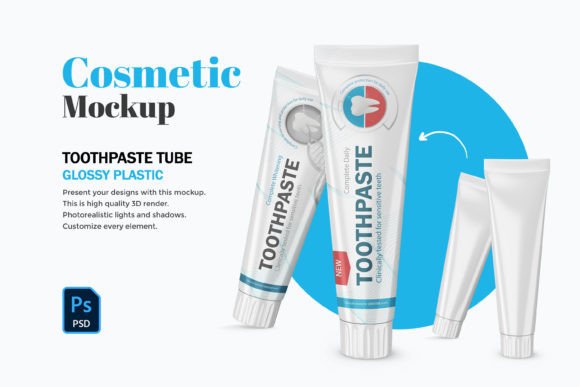
In the competitive world of product packaging, first impressions are often digital before they are physical. Whether you are launching a new oral care brand, pitching a design concept to a client, or simply organizing your portfolio, the visual presentation of your work dictates its perceived value. This is where the 3D Plastic Toothpaste Tubes - PSD Mockup becomes an indispensable tool. It is not merely a static image; it is a high-fidelity, editable environment that allows designers and business owners to visualize their concepts with photorealistic accuracy before committing to expensive manufacturing runs.
At its core, this resource is a high-quality 3D render converted into a fully layered Photoshop file. With dimensions reaching 6000x5000 pixels at 300dpi, the resolution is more than sufficient for large-format printing, detailed web zooms, or high-end marketing collateral. However, the true power lies in its architecture. The file includes smart objects, organized and named layers, and separate shadow controls. This structure transforms a complex 3D scene into an accessible workspace where users can edit lid colors, body hues, background settings, and specific design graphics with just a few clicks.
Why Visual Fidelity Matters Across Different Roles
The utility of a Plastic Toothpaste Tube - PSD Mockup varies significantly depending on who is holding the mouse. What serves as a time-saving shortcut for a seasoned agency might act as a crucial learning bridge for a student, or a cost-saving measure for a startup founder. Understanding these differing priorities helps in selecting the right tools for your specific workflow.
For professional graphic designers and art directors, the priority is often speed without sacrificing quality. When presenting multiple concepts to a client, rendering a unique 3D model from scratch for every variation is inefficient. A well-constructed mockup allows them to swap out artwork instantly via smart objects. The ability to tweak the shadow opacity independently ensures that the product sits naturally within any background context, whether it's a sterile bathroom counter or a vibrant retail shelf. For these users, the "organized and named layers" feature is not a luxury; it is a requirement for maintaining a clean workflow when files are passed between team members.
Empowering Entrepreneurs and Small Business Owners
For small business owners and entrepreneurs launching a new line of natural or cosmetic toothpaste, the stakes are financial. Manufacturing custom tubes requires minimum order quantities that can be costly. Before placing an order, these stakeholders need to see exactly how their logo looks on a curved plastic surface, how the gloss reflects light, and how the color palette interacts with the material texture.
Using a 3D Plastic Toothpaste Tubes - PSD Mockup allows them to test various color combinations—changing the lid from mint green to ocean blue or adjusting the body transparency—without paying for physical prototypes. This flexibility supports better decision-making regarding branding and packaging aesthetics. It bridges the gap between a flat logo file and a tangible product, giving founders the confidence to move forward with production or the insight to pivot before spending capital.
Value for Marketers and Content Creators
Marketers, bloggers, and social media creators operate in a visual-first economy. They need assets that stop the scroll. A generic photo of a toothpaste tube rarely engages an audience, but a hyper-realistic 3D render featuring custom branding can tell a story. These users often prioritize the "editable background" feature. Being able to match the backdrop to a specific campaign theme—such as a summer freshness vibe or a clinical hygiene focus—adds significant narrative depth to their content.
Furthermore, the high resolution (6000x5000px) ensures that these images remain crisp even when cropped for Instagram stories, Pinterest pins, or website headers. For influencers reviewing oral care products, using such a mockup to create conceptual "what-if" designs can generate engagement by inviting followers to vote on potential future flavors or packaging styles.
Technical Features That Drive Usability
The effectiveness of any mockup relies on its technical execution. This specific asset stands out because it balances complexity with user-friendliness. Here is how the technical specifications translate to practical benefits:
- Smart Objects: This is the engine of the file. Users simply double-click the layer, paste their flat design, save, and watch it automatically wrap around the 3D geometry with correct perspective and distortion. It removes the need for manual warping tools.
- Separate Shadow Layer: Lighting makes or breaks realism. Having the shadow on its own layer allows users to soften it, darken it, or move it slightly to match the lighting direction of their composite scenes.
- Editable Colors: Beyond the printed design, the physical attributes of the tube matter. The ability to change the plastic color of the cap and the tube body independently means one file can represent dozens of product variations.
- Organized Layers: In a file with thousands of pixels, finding the right element is crucial. Named layers ensure that even beginners can navigate the file without feeling overwhelmed by the layer panel.
Educational and Hobbyist Applications
For educators and students in design programs, this type of file serves as an excellent case study in packaging visualization. It demonstrates how 2D artwork translates to 3D forms. Students can deconstruct the file to understand how lighting affects plastic textures and how curvature distorts typography. It provides a safe sandbox to experiment with commercial-grade presentation techniques without needing advanced 3D modeling software like Blender or Cinema 4D.
Similarly, hobbyists interested in product design or 3D rendering can use this as a stepping stone. It offers a glimpse into professional workflows, allowing them to create portfolio pieces that look industry-ready. The high DPI ensures that even if they print these designs for a physical portfolio review, the quality remains sharp and professional.
Making the Right Choice for Your Project
Deciding whether this 3D Plastic Toothpaste Tubes - PSD Mockup fits your needs comes down to evaluating your current project goals. If you require a quick way to visualize a rebrand, need to present options to a stakeholder, or want to elevate your e-commerce listings with consistent, high-quality imagery, this tool is highly relevant.
However, if your goal is to engineer the structural integrity of the tube itself or simulate fluid dynamics inside the packaging, a dedicated engineering CAD program would be more appropriate. This mockup is designed for visual communication, not structural analysis. It excels in showing how a product looks, feels, and fits into a brand narrative.
Ultimately, the value of this asset lies in its versatility. It caters to the need for speed in a fast-paced market while maintaining the high standards expected in professional design. By offering granular control over colors, shadows, and backgrounds within a robust 300dpi framework, it empowers users across the spectrum—from the solo freelancer to the marketing director—to tell their product's story with clarity and impact. Whether you are refining a final pitch or exploring early concepts, having a reliable, editable visual foundation allows you to focus on creativity rather than technical hurdles.