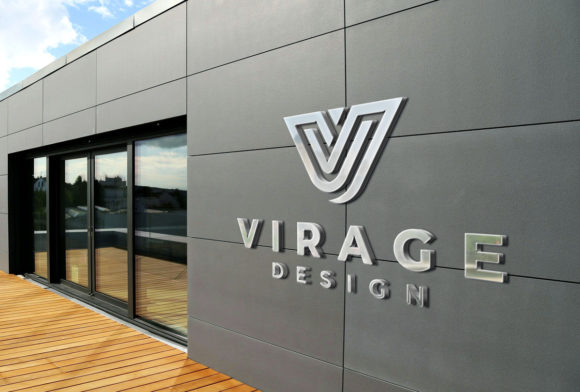
Elevating Brand Presentations with a 3D Signage Company Facade Logo Mockup
In the competitive landscape of branding and architectural visualization, the difference between a concept that gets approved and one that gets rejected often lies in presentation. Clients struggle to visualize flat logos on complex surfaces. This is where a 3D Signage Company Facade Logo Mockup becomes an indispensable asset in your workflow. It bridges the gap between abstract design files and tangible reality, allowing stakeholders to see exactly how a brand identity will inhabit a physical space before a single screw is turned or a dollar is spent on fabrication.
For designers, marketers, and signage manufacturers, integrating high-fidelity mockups into the pre-production phase is not just about aesthetics; it is a strategic move to streamline communication, reduce revision cycles, and secure buy-in. By utilizing a resource that offers layered PSD files, smart object editing, and photorealistic textures, professionals can transform a standard logo file into a compelling visual narrative that resonates with decision-makers.
The Strategic Role of Visualization in the Design Workflow
Understanding where a 3D Signage Company Facade Logo Mockup fits within a broader project lifecycle is crucial for efficiency. Traditionally, the process involved creating a 3D model from scratch, texturing it, lighting it, and rendering it—a time-consuming endeavor that could take days. Today, leveraging pre-made, high-resolution assets allows you to compress this timeline into minutes without sacrificing quality.
This tool serves multiple functions depending on the stage of your project:
- During the Pitch Phase: Use the mockup to present initial concepts. Seeing a logo rendered with realistic depth, shadows, and material properties on a building facade helps clients emotionally connect with the design.
- Mid-Project Refinement: When discussing materials (e.g., brushed aluminum vs. acrylic), swap textures within the mockup to demonstrate how different finishes affect the brand's perception.
- Post-Approval Marketing: Once the design is finalized, use the rendered images for portfolio case studies, social media teasers, or press releases before the actual sign is installed.
The key advantage here is context. A logo on a white background tells you nothing about its legibility at night, its scale relative to the entrance, or how it interacts with ambient light. A dedicated facade mockup provides this environmental context instantly.
Technical Specifications and Usability
Not all mockups are created equal. To ensure professional results, the asset you choose must meet specific technical criteria. A high-quality 3D Signage Company Facade Logo Mockup typically comes as a layered and well-structured PSD file. This structure is vital for maintaining flexibility. If layers are flattened or poorly named, your ability to make quick adjustments vanishes.
Look for files that utilize Smart Objects. This feature is the backbone of easy editing. Instead of manually warping and shading your logo to match the perspective of the building, you simply double-click the Smart Object layer, paste your design, save, and watch the mockup automatically apply the correct perspective, lighting, and texture effects. This non-destructive workflow ensures that your original vector art remains intact while adapting perfectly to the 3D environment.
Resolution is another critical factor. With a standard output of 2000x1350px, these mockups provide sufficient detail for high-definition screens, detailed PDF presentations, and web portfolios. While this resolution is excellent for digital delivery, always check if the source file supports upscaling if you intend to print large-format proposal documents.
Integrating Real Backgrounds and Textures
The realism of a mockup hinges on its textures and background elements. A generic grey wall rarely convinces a client. Effective mockups incorporate real-world textures like concrete, brick, glass, or metal cladding. These surfaces interact with light in specific ways, casting subtle shadows and reflections that ground the logo in reality.
When selecting a mockup, consider the architectural style of your client's building. A modern glass skyscraper requires a different presentation than a rustic brick storefront. Having a library of varied facade mockups allows you to tailor the presentation to the specific environment, showing the client that you understand their unique spatial constraints.
Practical Implementation: A Step-by-Step Integration
To get the most out of a 3D Signage Company Facade Logo Mockup, integrate it systematically into your design routine. Here is a practical approach to using these assets effectively:
- Preparation: Before opening the mockup file, ensure your logo is ready. Convert your logo to a high-resolution PNG with a transparent background or keep it as a vector shape layer. Clean up any unnecessary anchor points to ensure smooth scaling.
- Selection: Choose a mockup scene that matches the client's industry and architectural preference. If the client values tradition, select a brick or stone facade. For tech startups, opt for sleek metal or glass backgrounds.
- Execution via Smart Objects: Open the PSD file and locate the layer marked "Your Design Here" or similar. Double-click the thumbnail to open the Smart Object container. Paste your logo, adjust the size to fit the designated area, and save the file (Ctrl+S / Cmd+S).
- Refinement: Return to the main mockup file. The logo should now appear integrated. Check the blending modes and opacity if necessary. Most advanced mockups handle this automatically, but minor tweaks to brightness or contrast can help the logo sit more naturally within the scene's lighting conditions.
- Export: Save your final composition as a high-quality JPEG or PNG. For presentations, consider exporting a PDF slide deck that includes both the flat logo and the 3D facade visualization for comparison.
Enhancing Collaboration and Decision Making
One of the most significant benefits of using realistic mockups is the improvement in client communication. Ambiguity is the enemy of project approval. When a client sees a flat JPEG, they often ask, "But what will it actually look like?" This question leads to doubt and prolonged decision-making.
By presenting a 3D Signage Company Facade Logo Mockup, you answer that question preemptively. You remove the cognitive load from the client, allowing them to focus on the design itself rather than trying to imagine its application. This clarity often accelerates the approval process and reduces the number of revision rounds related to "visualizing" the end product.
Furthermore, these mockups serve as a common language between designers, architects, and fabricators. An architect can assess the scale and placement accuracy, while a fabricator can get a preliminary idea of the material finish and mounting style. This cross-disciplinary alignment prevents costly errors during the physical installation phase.
Maintaining Consistency Across Projects
For agencies and freelancers managing multiple clients, consistency in presentation quality builds trust. Using a standardized set of high-quality mockups ensures that every proposal looks polished and professional. It signals to the client that you pay attention to details and invest in tools that enhance the final deliverable.
Organize your mockup library logically. Categorize files by time of day (daylight, dusk, night), material type, or building style. This organization saves valuable time when a rush request comes in, allowing you to pull the perfect scene immediately rather than searching through disorganized folders.
Long-Term Value and Portfolio Development
Beyond immediate client projects, a 3D Signage Company Facade Logo Mockup is a powerful tool for personal branding and portfolio development. As a designer or agency, your portfolio is your strongest sales tool. Static logos on white backgrounds are forgettable. Dynamic, contextualized images tell a story of capability and vision.
Regularly updating your portfolio with mockup-enhanced case studies demonstrates your ability to think in three dimensions and understand real-world applications. It shows potential clients that you don't just design logos; you design brand experiences. This distinction can be the deciding factor when a prospective client is choosing between several competent designers.
Moreover, these assets are reusable. A single high-quality facade mockup can be used for dozens of different projects over years. The initial investment in acquiring or creating these resources pays off exponentially through repeated use, time savings, and increased conversion rates on proposals.
Conclusion: The Bridge Between Concept and Reality
In an era where visual content dominates communication, the ability to present ideas realistically is a core competency for creative professionals. A 3D Signage Company Facade Logo Mockup is more than just a pretty picture; it is a functional workflow tool that enhances clarity, speeds up approvals, and elevates the perceived value of your work.
By incorporating these layered, smart-object-enabled resources into your daily routine, you shift the conversation from "what if" to "this is." You empower your clients to make confident decisions based on clear visual evidence. Whether you are a solo freelancer looking to impress a local business owner or a large agency pitching to a corporate giant, the strategic use of photorealistic mockups ensures your designs are seen in their best possible light—literally and figuratively.
Embrace these tools not as a shortcut, but as a standard of practice. In doing so, you align your workflow with industry best practices, ensuring that your creative output is always ready for the real world.